Salvaging an Old PC to Be a Server: Part 2
In part 1, the highlight of the now saga is the LG file server, and in it particularly is the Western Digital 1TB Hard Drive. The WD10EZEX drive had to failed on me and became corrupted.
Windows would at first keep hanging, and I decided that it would be best to move on from it and use Ubuntu (22.04) instead. As I was installing Ubuntu, the computer would only detect only one of the two working drives. This alarmed me but I ultimately decided to ignore that and unplug the hard drive from the machine if I want to continue to install Ubuntu. I got the hard drive redetected somehow by swapping a SATA cable.
I reattached the drive and my heart sank when I saw startup messages saying that /dev/sdb cannot be read, due to an I/O error. I realized then and there that things went south real fast. At this point, the drive was going to be 3 years old.
I booted into Ubuntu, opened the terminal and did a sudo apt install ntfs-3g so that I could use sudo ntfsfix /dev/sdb1 to perform an NTFS check. It returned a volume corruption error and recommended using chkdsk and reaffirmed my suspicions. I plugged the drive into Windows, opened an administrator instance of cmd and did a chkdsk H: /f /r /x and just failed to do anything.
I realized that the NTFS partitions are junk so I deleted it and made it RAW. I figured out that I could recover whatever is left of it later1 using MiniTool Partition Wizard.
Several instances of a full Partition Recovery did nothing, so I opted for Data Recovery instead. I lost a lot of data. Although I managed to get a good portion of my multimedia back like videos, photos, and music; everything else is gone.
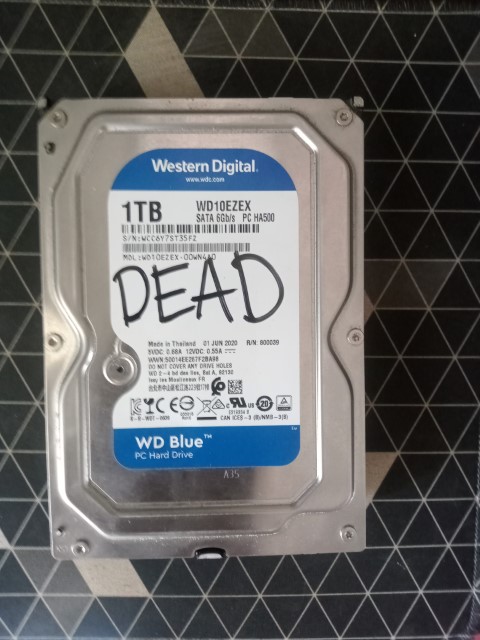
This drive was barely three years old. Disappointing. Have no sympathy. Don’t be a clown like me, learn from my ways and go get yourself some solid backups.
-
Where Do Deleted Files Go? | VSauce on Youtube https://www.youtube.com/watch?v=G5s4-Kak49o ↩︎